
Sing-Box Windows

A modern, cross-platform Sing-Box GUI client built with Tauri 2.0 and Vue 3 (Windows + Linux + macOS).
🌟 About the project
Sing-Box GUI is a cutting-edge cross-platform application (Windows, Linux and macOS) that provides a modern, intuitive interface for managing Sing-Box proxy configurations. Built on Tauri 2.0 and Vue 3, it delivers excellent performance, safety and user experience.
🎯 Highlights
- 🚀 Blazing fast: Rust backend with an optimized Vue 3 frontend
- 💎 Modern UI: a clean, responsive design built on Naive UI
- 🔒 Safe and reliable: the Rust backend brings memory safety and performance
- 🌐 Real-time communication: WebSocket-driven live data updates
- 🎨 Highly customizable: light and dark themes with rich personalization options
✨ Features
🎯 Core
- Proxy management: configure and switch between proxy modes with ease
- Subscription management: automatic subscription updates and organization
- Connection monitoring: real-time connection statistics
- Log management: complete logs with filtering and search
- Rule management: visual routing rule configuration
- System integration: system tray support for quick access
🎨 User experience
- Modern interface: a clean, intuitive design built on Naive UI components
- Localization: Simplified Chinese, English, Japanese and Russian
- Theming: light, dark and automatic themes with custom accent colors
- Responsive design: adapts to different screen sizes and DPI settings
🔧 Advanced
- Live statistics: real-time bandwidth and connection monitoring over WebSocket
- Autostart: launch at login, with optional delay
- Update management: automatic update checks and installation
- Memory efficiency: follows standard Vue.js and Pinia practices for efficient resource management
🚀 Installation
⬇️ Download the installer for your platform from GitHub Releases:
- Windows:
.exeinstaller - Linux:
.debpackage or.AppImageportable build - macOS:
.dmgdisk image or.apparchive
See the project documentation for detailed installation instructions.
🎯 Quick start
- Install the app: download and install sing-box-windows
- Install the core: on first launch, open Settings and download the Sing-Box core
- Add a subscription: add your subscription URL on the Subscriptions page
- Choose a proxy: pick a node on the Proxies page and set the proxy mode
- Connect: enable the proxy and start browsing
⚠️ Important: the core must be installed before you can add or use subscriptions — it is the component that actually runs the proxy service.
See the project documentation for a detailed walkthrough.
📦 Supported subscription formats
- sing-box JSON (top-level
outbounds):vless,vmess,trojan,shadowsocks,shadowsocksr,socks,http,hysteria2 - Clash/Mihomo YAML (
proxies):vmess,vless,trojan,ss(shadowsocks) - URI lists (one node per line):
vmess://,vless://,trojan://,ss://,hysteria2:// - Note:
hysteria2in YAML is not parsed yet
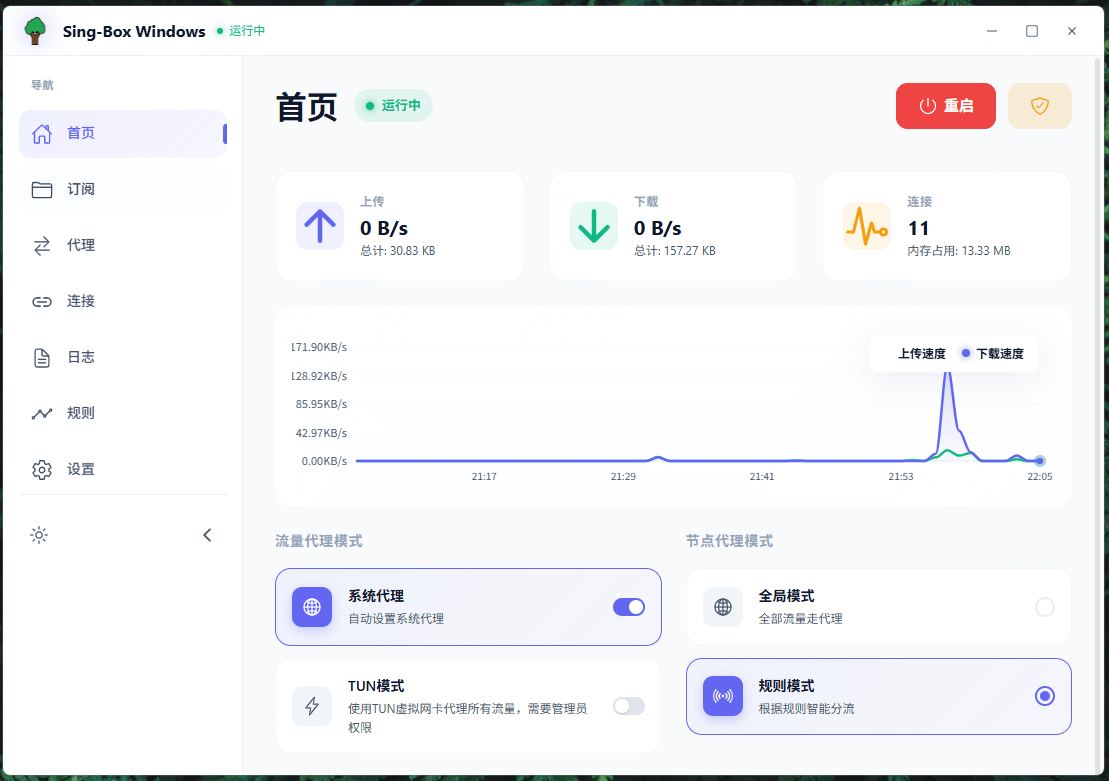
📸 Screenshots
🛠️ Development
# Clone the repository
git clone https://github.com/xinggaoya/sing-box-windows.git
cd sing-box-windows

# Install dependencies
pnpm install

# Start the dev server
pnpm tauri dev

# Build a release
pnpm tauri build
See the project README for detailed development documentation.
🔧 Storage
The app stores everything locally; all configuration and subscription data stay on your machine:
- Windows:
%APPDATA%\sing-box-windows\ - Linux:
~/.local/share/sing-box-windows/ - macOS:
~/Library/Application Support/sing-box-windows/
This includes app settings, subscription details and theme preferences, which keeps your privacy and data safe.
🤝 Contributing
Issues and pull requests are welcome!
- Report a problem: open an issue
- Suggest a feature: join the discussion
- Contribute code: fork the repo and open a PR
🙏 Acknowledgements
- Sing-Box — the powerful proxy core
- Tauri — an excellent Rust application framework
- Vue.js — the progressive JavaScript framework
- Naive UI — a beautiful Vue 3 component library
- Vite — the fast build tool and dev server
Disclaimer
This project is intended for learning and exchange only. All data is stored locally and is never uploaded to the cloud. Please follow the laws and regulations of your jurisdiction and use the software responsibly.