
Sing Box Windows Android (third-party Android client)
Note: this project is maintained by a third-party developer. Despite the name, only Android builds are published, and it has no connection to the official sing-box team. If you want the official client, go to sing-box for Android.
🎯 Overview
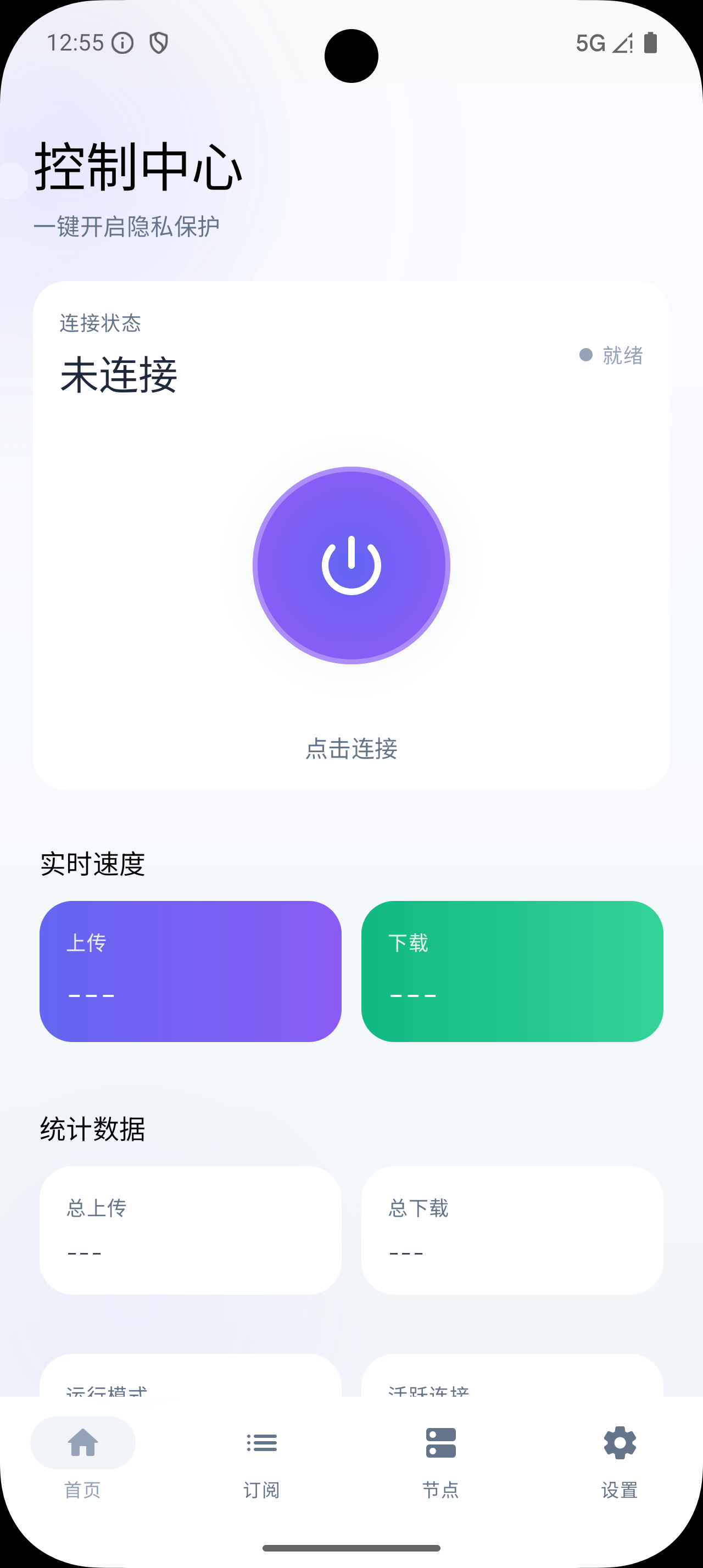
Sing Box Windows Android is a modern Android VPN client built on the sing-box core, offering simple and efficient proxy management. It supports several proxy protocols and pairs a polished interface with a solid feature set.
✨ Highlights
- 🚀 High-performance VPN service: built on the sing-box core for stable, reliable connections
- 📱 Modern interface: Material 3 design built with Jetpack Compose
- 🔗 Smart subscription management: add, edit and manage multiple subscription URLs
- ⚡ Live node latency tests: automatic latency testing to pick the fastest node
- 📊 Traffic monitoring: real-time connection and traffic statistics
- 🎯 Automatic node grouping: organize and manage node groups automatically
- 🔧 Multi-architecture: supports ARM64 and ARMv7 devices
- 🌐 Protocol coverage: full support for mainstream protocols such as VLESS and Shadowsocks
📱 Download and install
Latest release
Choosing an architecture
Pick the APK that matches your device architecture:
| Architecture | File name | Devices | Recommendation |
|---|---|---|---|
| arm64-v8a | app-arm64-v8a-release.apk | 64-bit ARM devices (most modern devices) | ⭐⭐⭐ |
| armeabi-v7a | app-armeabi-v7a-release.apk | 32-bit ARM devices (older devices) | ⭐⭐ |
System requirements
- Android version: Android 10 (API 29) or later
- Storage: at least 100 MB free
- Permissions: VPN permission and network access
🚀 Quick start
- Download the app: ⬇️ grab the APK for your architecture from the Releases page
- Install it: install the APK on your Android device
- Grant permissions: allow VPN and notification permissions
- Add a subscription: enter your subscription URL or import a local node list
- Connect: select a node and connect the VPN
📖 Usage guide
Adding a subscription
- Open the app and tap "Add subscription"
- Enter a name and the subscription URL
- Tap "Add" and wait for the sync to finish
- Select the subscription to enable it
Importing local nodes
You can also import a local node list:
- Tap "Import local" in subscription management
- Select or paste the node list content
- Save, and the locally managed nodes are ready to use
Node management
- Automatic selection: use the "Auto test" group to pick the fastest node
- Manual selection: choose a specific node inside a group
- Latency test: tap the test button to measure node latency
Traffic monitoring
- Live upload/download speed
- Cumulative traffic usage
- Connection status monitoring
🛠️ Technical details
| Item | Specification |
|---|---|
| Language | Kotlin |
| UI framework | Jetpack Compose + Material 3 |
| Core library | libbox (sing-box) |
| Min SDK | API 29 (Android 10) |
| Target SDK | API 36 (Android 15) |
| Build tool | Gradle with Kotlin DSL |
| Protocols | VLESS, Shadowsocks and more |
🔧 Building from source
Requirements
- Android Studio Hedgehog or later
- JDK 17 or later
- Android SDK (API 29+)
Build steps
# Clone the repository
git clone https://github.com/xinggaoya/sing-box-windows-android.git
cd singboxwindows

# Build a debug build
./gradlew assembleDebug

# Build a release build
./gradlew assembleRelease

# Install on a device
./gradlew installDebug
Project structure
app/
├── src/main/
│   ├── java/cn/moncn/sing_box_windows/
│   │   ├── config/          # Configuration management
│   │   ├── core/            # Core functionality (Clash API, status, diagnostics)
│   │   ├── ui/              # User interface (screens, components, theme)
│   │   └── vpn/             # VPN service
│   ├── res/                 # Resources
│   └── libs/                # Local dependency (libbox.aar)
└── build.gradle             # Module build configuration
Architecture overview
The app follows a singleton store + Compose reactive UI pattern:
- Store pattern: a singleton object with
mutableStateOffor global state - Repository pattern: persistence for configuration and subscription data
- Manager pattern: core coordination (OutboundGroupManager, CoreStatusManager)
See CLAUDE.md for the full architecture notes.
🤝 Contributing
Contributions are welcome! Please follow these steps:
- Fork this repository
- Create a feature branch (
git checkout -b feature/AmazingFeature) - Commit your changes (
git commit -m 'Add some AmazingFeature') - Push to the branch (
git push origin feature/AmazingFeature) - Open a pull request
Coding conventions
- Follow the official Kotlin style guide
- Use 4-space indentation
- camelCase for functions and variables
- PascalCase for class names
- Add comments where they help
📝 Changelog
See CHANGELOG.md for the full release history.
Recent changes
v1.1.0 (2025-12-23)
- Deeper Clash API integration with real-time traffic statistics
- Support for importing local node lists
- Refactored navigation with a bottom navigation bar
- Enhanced settings with automatic configuration saving
🐛 Reporting issues
If you run into a problem:
- Check the known issues
- Search the existing Issues
- If nothing matches, open a new issue and include:
- Device model and Android version
- App version
- A detailed description of the problem and steps to reproduce
⚠️ Known issues
- Some older devices may need notification permission granted manually
- Connections can be unstable on certain networks
- Subscription sync timeouts are fairly long (being optimized)
📄 License
This project is licensed under the MIT License.
🙏 Acknowledgements
- sing-box — the powerful network proxy tool
- Jetpack Compose — the modern UI toolkit
- Material Design 3 — the design system
⚖️ Disclaimer
This app is for learning and research only. Please comply with local laws and regulations. The developer assumes no responsibility for any consequences arising from the use of this app.